How I built AI tools to help me write about AI
There is nothing worse in today’s digital world than to get pulled into a piece of content that seems worth consuming, but after wasting anywhere from a few seconds to a few minutes, it’s pretty clear that the author either prompted the whole thing or gave up early and let AI do the rest.
The feeling is the same everytime. It’s like a wave of disappointment, then wrestling with the sunk cost fallacy, and finally giving up and admitting I’m doomscrolling. I’m not sure what’s worse: those weird (supposedly Russian) Elsagate youtube videos made to brainwash children or AI-slop text, images, and videos designed just to be doomscrolled.
But while AI may not generate interesting content, it can follow orders and be very logical. For example the /review-post skill, which we will cover later in the post, pointed out that I contradicted myself by saying, “AI slop is the worst thing online, but you’ll let AI write if it’s better?”. Clearly I forgot to make the point that while we should not use AI to generate an idea, we should be using it as a tool to improve it. Ideas are more than just answers to questions. If AI can generate a post, then that means anyone can prompt an AI and get a similar output. That’s not good enough to share, or worse, spend time reading it.
So, for the places where AI shines, I need to use it, even if that means giving it some editorial freedom. I can’t ignore AI for the sake of proving a point to my readers, well, lack thereof, that I will never use AI to write.
The Problem
- AI can research and write a decent article with a simple prompt.
- Autocomplete finishes my sentences pretty well, but it’s almost never what I would have said if I finished the thought.
- AI helps mask uninspired content
- Once a reader suspects AI, they start skimming, looking for listicles, or quit
Using AI to help me write very quickly turns into AI writing for me. I go from the driver to the passenger and the reader goes from hoping to find something inspiring to wiping the content from their brains just like anything else they’ve scrolled today.
So to try and fix all of this, I’ve build an AI writing buddy that respects the process of writing original ideas.
Building my AI writing buddy
I built my AI writing buddy using Claude. It’s currently built right into the blog’s infra and it’s specific to me and this blog. Could I abstract it and publish a skill anyone can use? Obviously, but skill-slop is a real thing. Also, I’m going to evolve these skills and commands over time.
As I start all Claude-Code (CC) projects, I started by talking into CC about exactly what I wanted to build. I rambled, repeated myself, but ultimately I was pretty clear about wanting tools that kept creative control with the human. AI can build a scaffold and provide me some prompts, but no actual blog text. That’s for me to actually use my brain.
What I Built
I asked CC to build me a set of commands and skills. Here’s what we created:
/new-post— scaffolds a draft: frontmatter, emptyimages/anddata/, a skeleton of short headings. It never commits, and it never flips a draft to published. Along with section headers, CC provides comments with writing prompts based off of my initial idea. None of the prompts the skill provides can be used in the blog, so I can ignore the prompts or use them to help me think./write— the co-writing partner, with three modes: talk it through, research, or co-write one chunk. The rule it can’t break is that it stays in the lane I point at. Ask for help with one paragraph and it doesn’t wander into the next section. (This paragraph is that mode, working right now.) The key thing (this is me again), is that it reads the voice.md and workflow.md files and the entire post so far before writing anything./review-post— the editor. It critiques — weak points, claims that need a source, the spots where I drift into corporate mush — but it doesn’t rewrite my sentences. It quotes my line and tells me what’s wrong. I do the fixing. (AI wrote this, hence the dashes)voice.mdandworkflow.md— not commands, just context. Every tool reads them first. One file says how I write; the other says the AI is a partner, not a leader, unless I explicitly hand it the wheel.
One note on words, since I keep using both: a command is a saved prompt you trigger
by typing /its-name; a skill is the same idea with extra wiring — support files and
the option for Claude to invoke it on its own when it’s relevant (Anthropic’s
docs have the full
version).
How I’m Using These Tools
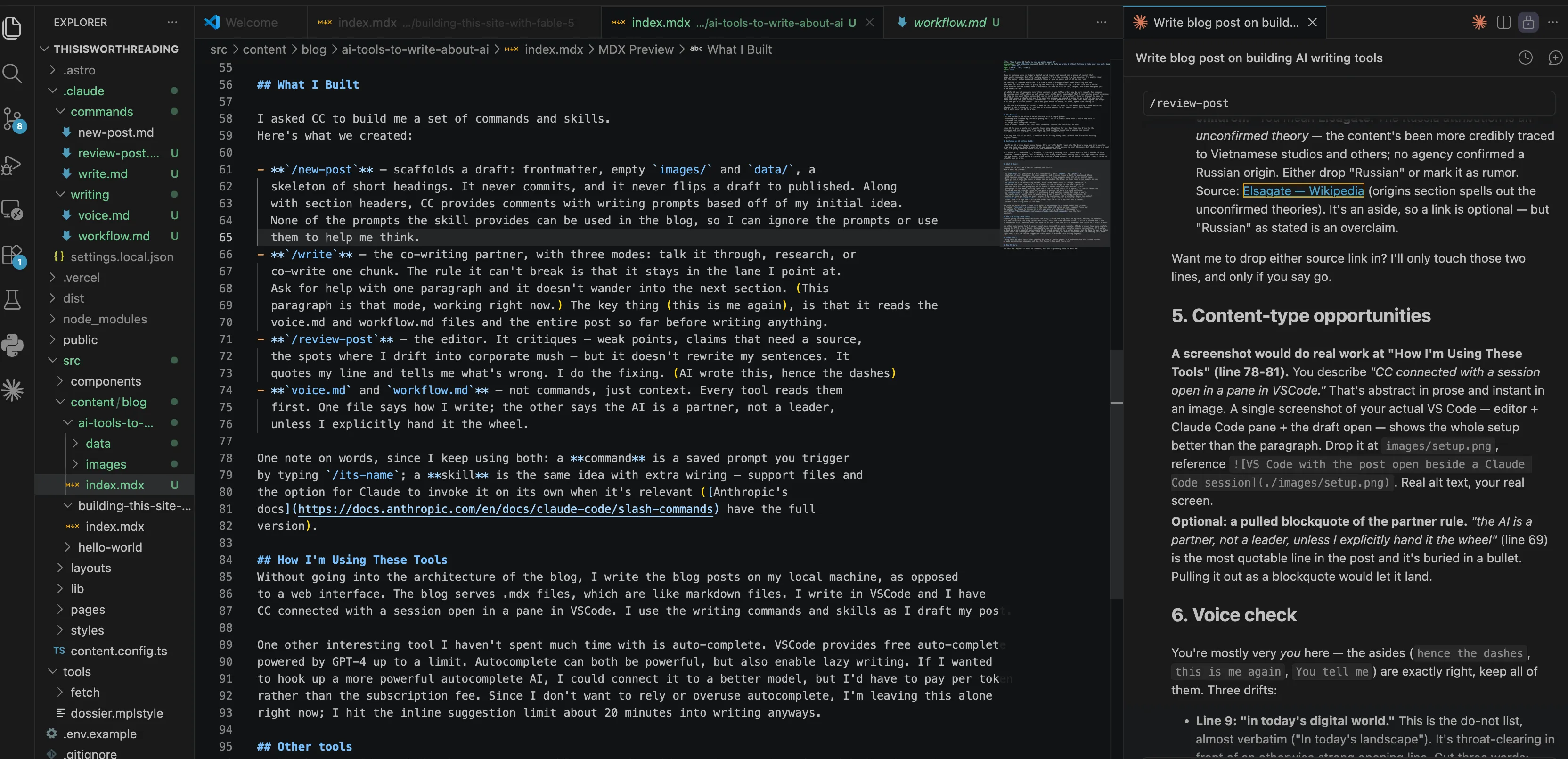
Without going into the architecture of the blog, I write the blog posts on my local machine, as opposed to a web interface. The blog serves .mdx files, which are like markdown files. I write in VSCode and I have CC connected with a session open in a pane in VSCode. I use the writing commands and skills as I draft my post.
Here’s what that looks like — the repo on the left, the post in the editor, and a Claude Code session running this very review on the right:
One other interesting tool I haven’t spent much time with is auto-complete. VS Code provides free auto-complete through GitHub Copilot’s free tier — around 2,000 completions a month, running on GPT-4o or Claude, not GPT-4. Autocomplete can both be powerful, but also enable lazy writing. If I wanted to hook up a more powerful autocomplete AI, I could connect it to a better model, but I’d have to pay per token rather than the subscription fee. Since I don’t want to rely or overuse autocomplete, I’m leaving this alone right now; I hit the inline suggestion limit about 20 minutes into writing anyways.
Other tools
I also have an ideas skill that captures my blog or coding ideas. I’m experimenting with Claude Design to make architecture diagrams and UIs, but haven’t done much there yet
Did It Work
You tell me. Maybe I’ll hook up comments, but you’ll probably have to email me.